
Ad Break Blocker
Blocks selected ad requests and clicks YouTube’s Skip Ad button when it appears. Playback remains under YouTube’s control.
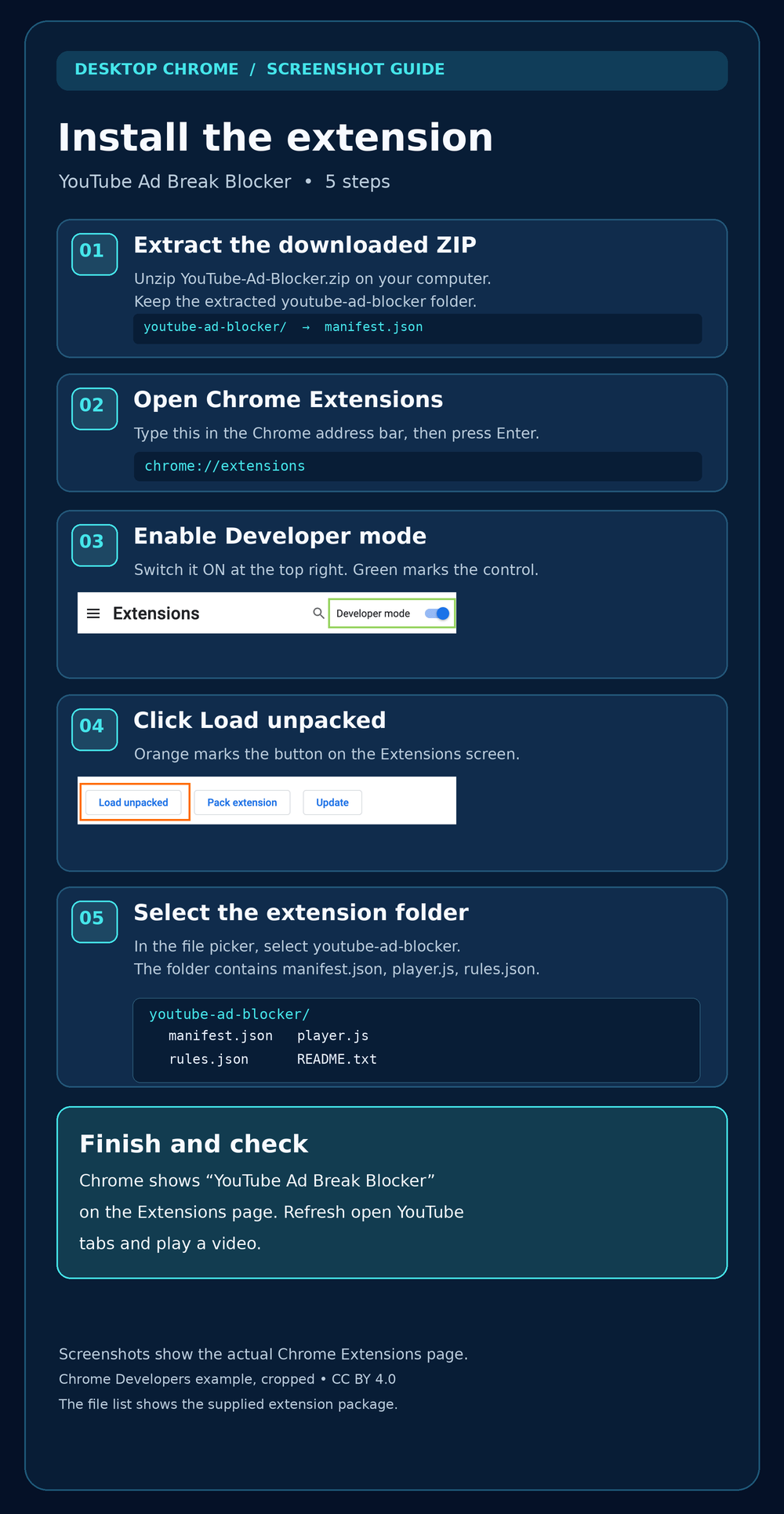
- Manual Chrome installation
- Screenshot installation guide included
- No companion app needed
Download permitted videos, turn speech into text, and reduce ad interruptions with focused tools for your computer.

Download the full packages and follow the setup notes for your computer.

Blocks selected ad requests and clicks YouTube’s Skip Ad button when it appears. Playback remains under YouTube’s control.
Save permitted YouTube videos with a local Windows app. Paste a link into its browser interface or connect the included Chrome extension.
Paste video links or import a text file, then turn spoken audio into downloadable transcripts on your own computer.
Useful tools should be easy to understand before you download them.
All three downloads are complete packages. The two media tools use a local companion; installing their Chrome extensions alone will not run them.

The ZIP downloads on this page are currently direct. If you add Payhip product links, the product buttons can open your Payhip listings for checkout and file delivery.
These are desktop packages. The downloader targets Windows 10/11; the transcriber supports Windows, macOS and Linux with its local companion. Manual Chrome extension loading is for desktop Chrome.
Yes for the downloader’s Chrome extension and the transcriber. Start the included local app on the same computer and follow its pairing steps. The ad blocker does not need one.
No guarantee. Ad coverage and download availability can change with YouTube’s delivery, access restrictions, and player behavior. The tools do not bypass sign-in or access controls.
Use content you own or have permission to save and process, subject to the source platform’s rules.
If Payhip listings are connected, the product buttons take you to Payhip for checkout and file delivery. The current direct-download ZIPs are publicly accessible.